


If you’ve embedded a YouTube video in WordPress and you’re seeing Error 153 — Video Player Configuration Error, this guide will fix it in under a minute.
⚠️ Confirmed fix — May 2026
What is YouTube Error 153?
Error 153 appears when YouTube’s embedded player can’t verify where the embed request is coming from. YouTube requires a valid referrer header to serve its embedded player — if the referrer is missing or blocked, it returns Error 153 instead of playing the video.
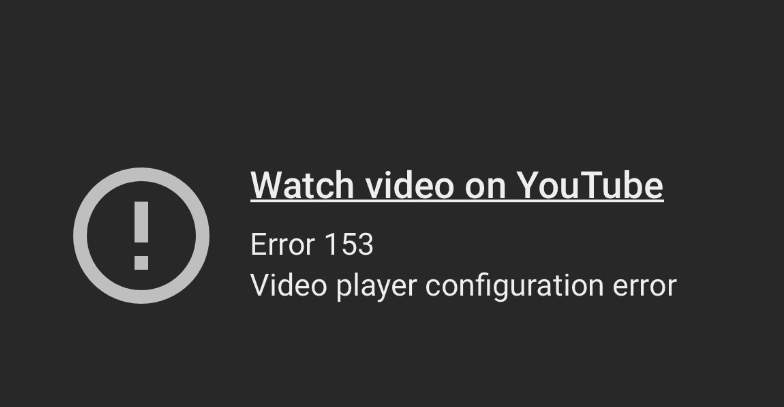
This is increasingly common on WordPress sites because several popular security configurations block or strip the referrer header as a privacy measure.
What Causes It on WordPress?
The most common cause in 2026 is Cloudflare’s “Add Security Headers” managed transform, which is available under Cloudflare → Rules → Settings → Managed Transforms.
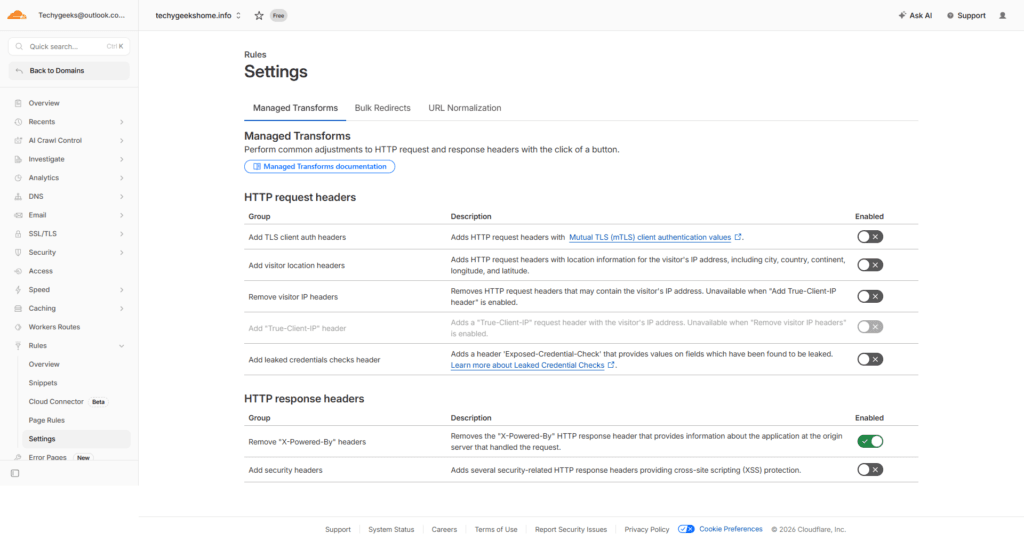
When enabled, this feature adds several HTTP security headers to your site including a strict Referrer-Policy header. This header tells browsers not to send referrer information when navigating between sites — which is great for privacy, but it breaks YouTube’s embedded player authentication.
Other possible causes include:
- A custom
Referrer-Policy: no-referrerheader set in your hosting control panel - A WordPress security plugin adding strict referrer policy headers
- Custom
.htaccessrules blocking referrer headers
The Fix — Cloudflare (30 seconds)
If you’re using Cloudflare:
- Log into your Cloudflare dashboard
- Select your domain
- Go to Rules → Settings
- Click Managed Transforms
- Find “Add security headers” and toggle it OFF
- Save
That’s it. Refresh your page and the YouTube embed will load correctly:
Why This Works
Disabling the security headers managed transform stops Cloudflare from adding the strict Referrer-Policy header to your responses. Without that header, browsers use their default referrer policy (strict-origin-when-cross-origin) which sends enough referrer information for YouTube to authenticate the embed request.
Alternative Fix — WordPress functions.php
If you want to keep Cloudflare’s security headers but fix the referrer policy specifically, add this to your child theme’s functions.php:
php
// Fix YouTube Error 153 - set correct referrer policy
function referrer_policy_header() {
    header('Referrer-Policy: strict-origin-when-cross-origin');
}
add_action('send_headers', 'referrer_policy_header');
This explicitly sets the referrer policy to strict-origin-when-cross-origin which satisfies YouTube’s requirements while still providing reasonable privacy protection.
Other Causes and Fixes
If you’re not using Cloudflare, check these:
- Your hosting control panel — look for security headers settings and check if a
Referrer-Policy: no-referrerheader is being set - WordPress security plugins — Wordfence, iThemes Security and similar plugins can add referrer policy headers. Check their settings for anything referrer-related
.htaccess— search your.htaccessfile forReferrer-Policyand remove or modify any strict referrer rules
Frequently Asked Questions
Does disabling Cloudflare security headers make my site less secure?
Slightly, yes. The security headers provide protection against cross-site scripting and clickjacking attacks. If you want to keep the protection, use the functions.php alternative fix instead which sets a less strict referrer policy rather than removing it entirely.
Does this affect all YouTube embeds or just some?
All YouTube embeds on your site will be affected by Error 153 if the referrer header is blocked. The fix resolves it for all embeds site-wide.
Will this fix Error 153 on other video platforms?
Possibly. Vimeo and other video platforms have similar referrer requirements. The same fix should resolve Error 153 or similar errors on other embedded video players.
I’m not using Cloudflare but still getting Error 153 — what do I do?
Check your hosting control panel for security header settings, and check any WordPress security plugins you have installed. The root cause is always a missing or blocked referrer header.
About The Author

Related
Discover more from TechyGeeksHome
Subscribe to get the latest posts sent to your email.