

The real problem it solves
Touchscreen typing still feels slow for long messages. You lose screen space to on-screen keyboards. Typos interrupt flow. Voice input fails in public. The Clicks Communicator starts with that friction. Smartphones handle serious work now, but typing remains the weakest link. Clicks Communicator brings back physical keys to solve speed, accuracy, and screen real estate in one move. Instead of adding another device, it reshapes the phone you already carry. This product targets writers, professionals, and heavy texters who live in email, messaging, and notes. The goal isn’t nostalgia. It’s efficiency.
Unboxing & first touch
The Clicks Communicator arrives in clean, minimal packaging. Inside, you get the keyboard case and basic setup guidance. The case feels solid the moment you pick it up. Materials feel durable without adding unnecessary bulk. Keys sit flush and evenly spaced. There’s no wobble or rattle. Attaching your phone feels secure and intentional. First impressions focus on confidence. This doesn’t feel like a novelty accessory. It feels purpose-built.

Design & interface
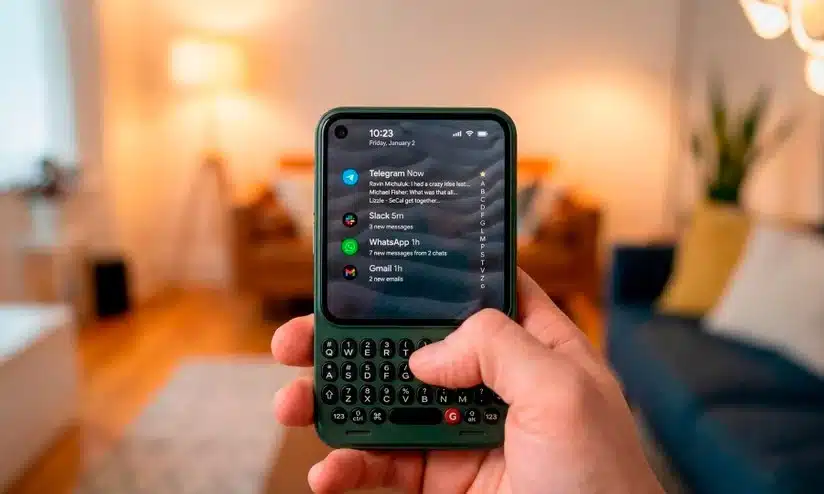
Clicks Communicator combines a protective phone case with a full physical keyboard. The keyboard sits below the screen, freeing the entire display for content. Keys use a sculpted layout with clear separation, which reduces mistypes. Backlighting improves visibility in low light without being distracting. The case extends the phone vertically, which changes the balance but improves grip for typing. Design favors function over slimness. The interface relies on muscle memory rather than visual clutter.
Connectivity & pairing
The keyboard connects directly through the phone’s physical port, not Bluetooth. That choice eliminates pairing steps, latency, and battery anxiety. Once attached, it works instantly. Key presses register immediately with no lag. There’s no wireless interference or dropped connection. The Clicks Communicator benefits from that simplicity. You never think about connectivity because it just works.
Hardware deep dive
Clicks Communicator uses mechanical-style keys tuned for mobile use. Key travel feels deliberate but not deep. Actuation feels crisp without excess noise. The frame reinforces the keyboard area to prevent flex during typing. The case protects the phone edges while keeping ports accessible. Hardware decisions prioritize durability and consistency over ultra-thin design. Everything feels engineered for repeated daily use.
Typing feel & productivity logic
Typing speed improves quickly after a short adjustment period. Physical keys reduce errors and increase confidence. Shortcuts and key combinations speed up navigation, text selection, and app switching. The biggest gain comes from reclaimed screen space. With no on-screen keyboard, content stays fully visible. That alone changes how productive the phone feels. Long emails and notes become realistic again. The Clicks Communicator highlights how fast the keyboard disappears once muscle memory takes over.
Battery, charging & power behavior
Because the keyboard draws minimal power from the phone, battery impact stays modest. There’s no separate battery to manage. Charging behavior remains normal through the phone’s port or pass-through support, where available. Power consumption never becomes noticeable during daily use. You don’t add another device to charge, which keeps friction low.
The mobile app experience
Clicks does not require a companion app for basic use. Keyboard behavior integrates directly with the phone’s operating system. This keeps setup simple and avoids permission creep. System-level keyboard settings handle language, shortcuts, and accessibility. The lack of an app reinforces the product’s focus on hardware-first productivity.
Alternatives compared
Bluetooth keyboards offer flexibility but add bulk and pairing friction. Folding keyboards travel well but require a surface. On-screen keyboards maximize portability but slow typing. Phones with built-in keyboards no longer exist at scale. Clicks Communicator fills that gap by integrating directly with modern smartphones. It trades pocketability for performance. For the right user, that trade-off feels worth it.
Who it’s perfect for
This keyboard case fits writers, professionals, journalists, and heavy communicators. It works well for email-heavy workflows, messaging, and note-taking. Anyone who types more than they scroll will feel the difference.
Who should skip it
Skip this if you value slim pockets above all else. Casual users who send short messages won’t benefit much. People who prefer one-handed phone use may find the added length awkward.
Final decision
Buy it if you type often and want faster, more accurate mobile input.
Skip it if you prioritize ultra-compact phone size over productivity.
Only if you commit to adjusting your grip and typing habits.
The Clicks Communicator ends with clarity. This accessory doesn’t try to do everything. It fixes one core problem decisively. If typing slows you down on your phone, Clicks changes the experience in a way software never could.