

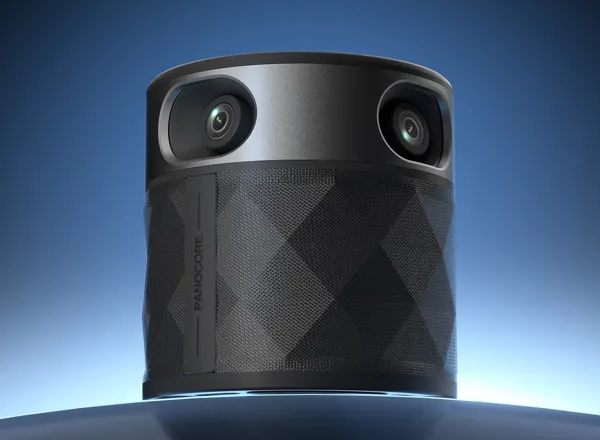
Nowadays, most tech companies and modern businesses conduct their work meetings online. Hosting an online meeting is straightforward when each participant joins from their personal laptop, but it requires a different approach when several coworkers are gathered in the same room. An all-in-one conferencing system solves this problem by combining multiple cameras, microphones, and speakers into a single device, allowing everyone in an in-person group meeting to be recorded and heard clearly. For teams looking for an easy-to-use solution that simplifies online group meetings, the new OSO PanoCore 360 is your go-to choice.
The OSO PanoCore 360 is a portable conferencing system that features four 1080p HD cameras, which provide seamless 360º video capture, an omnidirectional 8-microphone array for capturing voice audio, and a built-in HD speaker that delivers natural, room-filling sound. The system supports up to 12 participants without additional hardware and offers two display modes, including panoramic auto-focus and half-and-half split modes.
The system also features a proprietary edge AI chip that enables real-time speaker tracking, auto-framing, and local video/audio recording handled by a secure AI platform. It also integrates Microsoft’s translation API for real-time multilingual communication, and “Hey Chloe”, a built-in voice assistant that lets users access AI insights or retrieve information during offline meetings. The device boasts USB-C connectivity for an easy setup.
Designed to transform collaboration between teams, this innovative conferencing system redefines group meetings by delivering a full panoramic view of conference rooms and crystal-clear audio through a plug-and-play setup.
In this article, we have a closer look at the OSO PanoCore 360 and go over the standout features this all-in-one conferencing system has to offer you.
DESIGN & SPECS
Starting with its size, the device has a compact form factor, measuring just 3.34 inches in diameter by 3.93 inches tall (8.5 x 10 cm). It’s also quite lightweight, weighing just 1.81 lbs. (0.82 kg).
The OSO PanoCore 360 also sports a modern design, which gives it a professional and discreet appearance.

OSO PanoCore 360 – Compact footprint / Modern design
The device also packs a durable, high-quality construction.
Moving on to the main components that integrate this all-in-one conferencing system. For capturing video, the OSO PanoCore 360 comes equipped with four 1080p HD camera lenses, which provide continuous 360º video coverage of a room, streamed in 1080p HD.

Equipped with four 1080p HD cameras that record 360º video
To capture voice audio, the system leverages an omnidirectional 8-microphone array that picks up voices naturally from every direction up to 10 feet away, ensuring everyone in your group is heard properly.
To reproduce audio playback from people on the other end of your meetings, the device comes equipped with a built-in HD speaker that delivers clear, balanced audio, keeping conversations natural and uninterrupted.

Features an omnidirectional 8-mic array for capturing voices and a built-in HD speaker for audio playback
According to OSO, the device can support meetings with up to 12 participants when connected to a single computer without requiring additional hardware.
The system also integrates a proprietary edge AI chip, which enables real-time speaker tracking, auto-framing, and local video/audio recording handled by a secure AI productivity platform powered by ChatGPT-5. Video clips are saved in 2-minute segments to ensure stable, reliable recording.

Integrates an AI chip that enables real-time speaker tracking, auto-framing, and local video/audio recording
In addition, it also integrates Microsoft’s translation API to support real-time multilingual communication, making global collaboration effortless.
What’s more is that the system also features a built-in voice assistant that can be activated by simply saying “Hey Chloe”, allowing users to access AI insights or retrieve information during offline meetings.
INTERFACE / CONTROL PANEL
For controlling its operation, the device features a button control panel at its top side, which has a simple, user-friendly interface.

In regard to its video recording functionalities, the system offers two display modes designed for different meeting scenarios. The first one is panoramic mode with auto-focus, which captures the entire group in a full 360º panoramic view while automatically focusing on the active speaker for a smoother, more engaging meeting experience.

Panoramic auto-focus display mode
Its second mode is a half-and-half split mode, which provides a view of your conference room in dual 180° widescreen for complete meeting visibility.

Half-and-half split display mode
CONNECTIVITY & COMPATIBILITY
When it comes to its connectivity method, the OSO PanoCore 360 features USB-C connectivity, offering teams a simple plug-and-play setup.
The device comes with a desktop tripod for keeping its cameras at a face-level, and also includes a USB splitter and power adapter to ensure full performance on older or low-power computers.

Features USB-C connectivity / Compatible with most modern video conferencing platforms
As for its compatibility, know this all-in-one conferencing system is compatible with Microsoft Teams, Google Meet, Zoom, and Webex, among other video conferencing platforms.
PRICING & AVAILABILITY
If you’re interested in purchasing the OSO PanoCore 360, know each unit is priced at $199.99. You can order it online from PanoCore’s Amazon store page.